
One of our Revit “last 10%” complaints was always about the obtuse “halftone” toggle for visibility graphics and appearance settings. We pretty much assumed that it is literally 50% of whatever the original color is.
The thing is, even when we “ghosted” linework in AutoCrap and called it “halftone”, it was really about 65%, not 50%. 50% is just too darn light.
Apparently, the Revit guys, when they weren’t working on shiny new plastic-like icons, decided to add something practical to 2010. We can now control the halftone setting on a project basis.
If you go to MANAGE – SETTINGS you will see the new HALFTONE/UNDERLAY control.
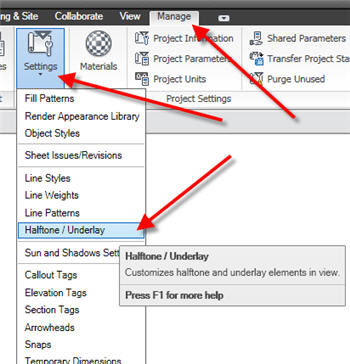
This will bring up a beautiful little slider that lets you control exactly what the “half” in “halftone” means.
Slide up or slide down, whichever way you want to slide now, Revit lets you.
 Design Tech Field Guide