
I have a running list of “REVIT MYSTERIES’ on my desk (I’ve already discussed one of those mysteries). One day, I would like to take this list with me into a room of the developers and ask “why”.
Until then, I shall whine about it here and maybe someone out there has a good explanation. Today’s case: The Mystery of the Vanishing Strucutral Column!
Something is happening wiht drawing order and how things are cut. I cannot find much other folks with this issue, but I can consistently get something weird to happen. At least I think it’s weird.
Let’s say I place a wall. Let’s say I place some components (structural columns) in that wall. Now I do a callout of the area.
If I do a callout and set the type to FLOOR PLAN, things seem to come in how I expect.
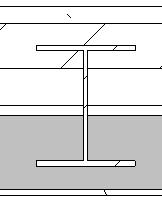
If I do a callout and set the type to DETAIL VIEW, then I get some odd results. Hatches and lines overlap. Things don’t seem to cut clean.
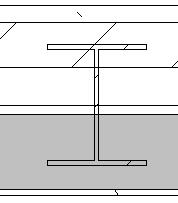
Why is this? Is Revit making assumptions about what I want to do with DETAIL VIEWS? That I plan on slapping detail components everywhere? How presumptive of Revit.
Detail Views have some very different settings than a “standard” floor plan callout view. The help file does not explain this graphic difference, however.
I would really love to hear an explanation. Right now, we just kind of avoid Detail Views, and if someone took the time to make them function differently, I would love to know why.
 Design Tech Field Guide