

When I started back up at Moseley a touch over half a year ago, we knew that Revit 2027 was on the horizon and I knew that was a top task for this role. In a lot of my conversations, I specifically said “I don’t plan on making big changes to the templates. Just gonna let things roll as they are.”
Well, turns out I am a big fat liar.
But I don’t want to talk about the tweaks, I want to share 2 specific tools that I vibe-coded to support those tweaks.
Dashboards!
Model health is a bit of a passion of mine. And one of the best ways to raise awareness is to throw it in everyone’s face. So we updated the start page from a static project info page to a (mostly) dynamic dashboard with dials showing some model health metrics like imported DWGs, views not on sheets, and in-place families.
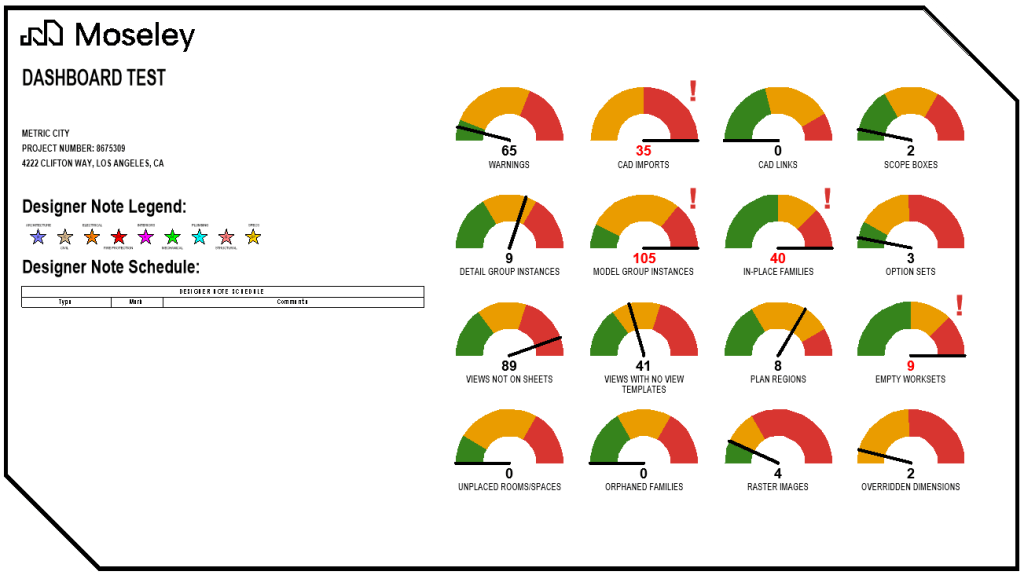
Doing some planning with Claude and then vibe coding, we developed an “invisible” addin that kicks off when a project is opened, grabs the data, and updates a slew of Global Parameters that hold the values. (I knew I would find a use for those one day.) Those parameters drive the instances of this little dial family that I built and now have loaded into this very specific titleblock.
Honestly, the hardest part was getting the dials to rotate correctly.
Because of standard worksharing rules, the first person to open the model checks out the dials and updates them, so the data may not be “real time” for every user, but it’s “close enough to real time” for the team to understand what might be in the red and that they may want to take a look at.
View Types vs View Templates
I love View Templates. One of my favorite Revit expressions (you don’t have favorite Revit expressions?) is “If you aren’t using View Templates, you are wasting your time.”
One thing we like to do is align our View Types with a corresponding template. You create a new view and whatever type is selected already has the correct template!
But… what happens if you picked the wrong type?
Well, you just change the View Type… and the View Template does NOT change.
This is an odd gap in Revit’s basic functionality. It was all the way back in 2013 when we could create our own Plan View Types… and it looks like the same year when View Templates finally became “sticky”. And since then this disconnect has bothered folks.
I started the day with just a random early morning question to Claude “Is it possible to build an add-in that watches when a view type is changed and automatically change the template as well?”
And then about 40 minutes later, we had a working prototype.
This addin runs hidden in the background and when a user changes the View Type, it sees that there was a change and hops into action. If the new View Type has a default View Template, Revit changes it automatically! (We even built a little JSON file to make custom and override Type to Template matches.)
Just Ask!
I’ve seen “live” dashboards before, so this idea wasn’t new. And while I might have missed it, I have never seen a View Type/Template sync add-in. Maybe it was too simple a problem? Maybe I will regret rolling it out with Revit 2027? But if you have any tiny inkling of something you want Revit to do, this is a wild time when you can just spin up your favorite AI tool and ask!